
Server component
Manages data exchange between the office accounting system and the mobile devices of the sales team.
PalmOrder gives field representatives current products, prices, stock and customer data, helps create an order on a mobile device, and sends completed documents back to the office system.
Manages data exchange between the office accounting system and the mobile devices of the sales team.
Gives the representative products, customers, prices and order tools on a smartphone or tablet.
Open data exchange lets PalmOrder connect to BAS and other accounting systems.
PalmOrder connects a field representative’s mobile work with the data and documents of the office accounting system.
Products, prices, stock, customers and completed documents.
Manages data exchange between the office and the mobile team.
A representative’s mobile workplace for creating orders, accepting payments and recording visit results.
A barcode scanner and mobile printer connect to the device.
→To the device: products, prices, stock, customers and routes
←To the office: orders, payments and visit results
One consistent process without re-entering information from paper.
The office system prepares the current catalogue, prices, stock, customers and routes.
The PalmOrder server sends the prepared data to the representative’s mobile device.
The representative creates an order, applies prices and discounts, and records the visit result.
Completed documents return to the accounting system for warehouse, logistics and further processing.
The interface shows the representative exactly the data needed when working with a customer.
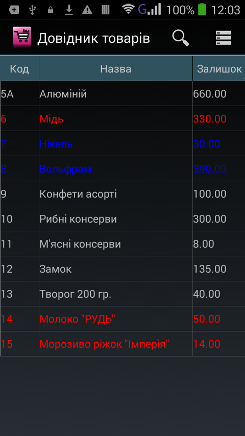
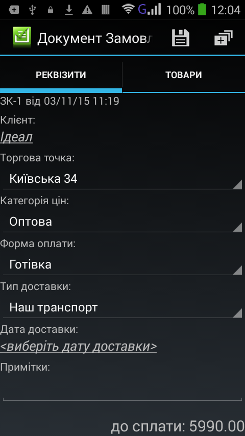
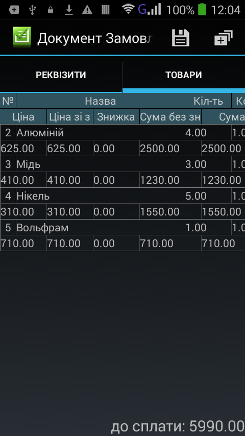
Data and operations are brought together in one mobile application.
Products, prices and stock prepared by the office system.
Contact details, trading terms and debt information.
The customer price category and discounts for individual lines or the whole order.
Documents are created directly during the visit.
Completed actions and data needed by the office team are recorded.
New documents are sent to the accounting system for further processing.
Create an invoice or delivery note as a PDF and send it to the customer immediately.
The system records the sales representative’s route during field work.
Operators do not need to re-enter orders from paper.
Prices, customers and products come from prepared data.
The office receives documents as soon as synchronisation is complete.
Tell us what data and documents your team uses — we will help define the right exchange workflow.